Technical Guide
2026
-
C++ Ecosystem in Windows and Linux- Graphics Rendering Focused
(work in progress…)
Due to the faster computation, C++ is still (2026) the best choice for real-time rendering and Python is far behind in this real-time performance race. C++ is a powerful language with different excellent features, some are the latest version-dependent as well. Nonetheless, over the years, I have noticed, some of the commonly used C++ features used in graphics rendering are, Pointer and References (the smart pointer might be helpful to reduce data leak), STL, Type Casting, Vecot and Matrix Operations, etc. These are some of the frequently used features.
Someone working (or interested working in Graphics Rendering) may already have profound knowledge of the language. Besides, I might recommend some of the excellent learning resources, viz. Learncpp, CPP Reference, MS C++ documentation, MS C++ Blog, CppCoreGuidelines, cpp different versions’ features cheatsheets, isocpp, cppcon, helped me understanding the language. However, learning by actually coding is the best way in my opinion. There are several git projects for C++, e.g., Bjarne Stroustrup’s Github repository, 30-seconds-of-cpp, cppbestpractices, project-based-learning.
Naming convention for a C++ project may vary company to company, even among different developers’ team. The google C++ style guide is a popular choice. Besides, someone can check C++ Best Practice, similar to Boost Style and C++ Coding standard. The Hungarian Notation was once a popular choice as well.
Documentation is essential for understanding the gist of the code in the quickest possible time. Unfortunately, in my experience, this is the part where the development team often pay the least attention. Doxygen is being used for long time for documentation purposes.
A robust package manager system is important for developers to maintain the standard and open-source libraries, especially to maintain the appropriate version. Unlike Linux, Microsoft OS does not have a central package management system. However, VCPKG does the job, and suitable with CMake. It is cross platform. Other than VCPKG, there are some other package manager, e.g., Conan, Hunter also popular.
The success of graphics rendering remains in efficiently debug and
profiling, both CPU and GPU side. Other than someone using the Visual Studio, or Visual Studio Code, or any other IDE, there are a bunch of online compilers, e.g., Compiler Explorer, online gdb, C++ Shell, wandbox, Coliru useful sometime. For online benchmark, you can check quick-bench, perfbench, buildbench, CPP Insights- what compiler sees. Moreover, these off-line tools code analyzer: lizard 1.17.9-lizard 1.17.9, coverage code: Gcov is a source code coverage analysis and statement-by-statement profiling tool are also handy. Besides, for the GPU side profiling there is a whole bunch of tools, e.g., PIX, NVidia Nsights, etc (will write an in-depth article on this topic in future)Linux Specific
Resources
Future of C++
Probably, Rust (👍🏽), Lua, Nim, Zig, C3, Golang/Go, Dart, Carbon could be name as the Successors of C++ language.
2025
-
Microsoft vcpkg
(work in progress…)
Unlike Linux, the Microsoft Operating System (OS) does not have a central library controller. The vcpkg can partially do the job, but sometimes with a bit extra tuning. Besides, there are several package manager exists. One popular alternative option is the
Conan. However, here are some instructions on vcpkg, could be helpful for the beginners.MS-vcpkg
vcpkg has two operation modes:
classicandmanifest. During the classic mode, installs packages globally in a shared installed directory (e.g.,C:\vcpkg\installed\x64-windows), managed by explicit vcpkg install commands, like traditional system package managers (apt, brew) but local to the vcpkg root, whilemanifestmode uses a project-specificvcpkg.jsonfile for declarative dependency management, installing packages into a project-localvcpkg_installedfolder, offering better version control and project isolation. Moreover, the manifest mode is often recommended for most of the new projects due to its explicit dependency declaration and easier reproducibility, whereas classic mode suits simpler, shared library setup.Clone and Setting
- Clone the repository in any suitable directory (often prefer
C:/drive). Therefore, for githubcd C:\ git clone --recursive https://github.com/microsoft/vcpkg.git - Then
Environment Variables >> System Variables >> path >> new >> (add) C:\vcpkgHowever, I found no visible effect whether set it or not.
Install vcpkg
- run
.\bootstrap-vcpkg.bat- Windows Power Shell
.\vcpkg integrate install(!important: this will integrate with current visual studio)- Save a copy of the CMake Instruction for future use for me:
CMake projects should use: "-DCMAKE_TOOLCHAIN_FILE=C:/vcpkg/scripts/buildsystems/vcpkg.cmake"
Search, Install, and Integration
- Search
.\vcpkg.exe search library_name(e.g., opencv) - Install
.\vcpkg.exe install library_name:x64-windows(:x64-windows for x64 machine, otherwise x86 is default). This might take a while!. - Someone can find the downloaded library under installed folder, e.g.,
C:\vcpkg\installed, also underpackagesfolder. Also,
.\vcpkg.exe listwill return all installed libraries- After installing the library, run
.\vcpkg.exe integrate installto integrate with visual studio.- This
integrateis important if someone want to access files easily underC:\vcpkg\installed\x64-windows\includedirectory
- This
Uninstalling packages
- to uninstall particular package
.\vcpkg.exe remove package_name:x64-windows - sometimes it may need to use
--recursecommand if other packages are depend on that packages, e.g.,.\vcpkg.exe --recurse remove python3:x64-windows - to uninstall all packages
.\vcpkg.exe remove *:x64-windows - Against
.\vcpkg.exe integrate->vcpkgis deleted. To removevcpkg integrate removeneed to call.
Some packages like boost, and qt5 are “meta-packages”. This means that these packages themselves are empty, and what they do is depend on other packages to install them all together as a convenience (not clear).
Using in C++ (tried on Visual Studio 2022) project
- Create an empty project
- Check what
debugmachine it isx86/x64 - Simply use
#include<start_the_library_name>, the library will appear - If not, then have to do it a bit manually (if there is any other solution, I will add later)
- type
.\vcpkg.exe integrate projectin the power shell and follow the instruction. Generally the instruction is: - With a project open, go to
Tools->NuGet Package Manager->Package Manager Consoleand paste:Install-Package vcpkg.C.vcpkg -Source "C:\vcpkg\scripts\buildsystems"
- type
vcpkg to Cmake
- How to add to CMake command line
-DCMAKE_TOOLCHAIN_FILE=C:/vcpkg/scripts/buildsystems/vcpkg.cmake?
cmake_minimum_required (VERSION x.x) set(CMAKE_TOOLCHAIN_FILE "C:/vcpkg/scripts/buildsystems/vcpkg.cmake") project (project_name) file (GLOB_REUSE fileCollection "Source/*.h" "Source/*.cpp" ) find_package(assimp CONFIG REQUIRED) add_executable (project_name ${fileCollection}) #find_package can also be here target_link_libraries(project_name PRIVATE assimp::assimp)Resources
- Clone the repository in any suitable directory (often prefer
-
Dual Boot Mode: Ubuntu on Top of Windows
Formatting Booted USB (Windows), if normal formatting not work
cmd -> type "diskpart" list disk select disk <number> clean create partition primary format fs=ntfs quick // format fs=fat32 quick //optional step assign letter=h //any letter you want to exit
Boot USB Flash drive
- Check the windows BIOS mode,
run>> msinfo32>> BIOS Mode- If target system is
UEFIthen partition schemeGPT - If target system is
BIOS/ CSM/Lagacythen partition schemeMBR👍🏼 selecting MBR is better
- If target system is
- Download rufus to make USB stick bootable and run as
Administrator- if
rufusdon’t see the.isofile, copy the.isotoC:drive in a folder, e.g.,iso
- if
1.a) Advanced Way Dual Boot
- Follow single/dual boot this tutorial until 6.43m -> select
something else
1. b) Generic Way (~Making USB Bootable~)
- Read this tutorial
- recommended software- balenaetcher
- How to
- install ubuntu ISO and install balenaetcher software (minimum 4GB space on USB stick)
- flash from file -> select the ISO
- select target -> select the usb
- Flash
Boot Key, Varies on Motherboard ~Booting (Ubuntu) on Windows OS~
- Need to accessed the UEFI menu. Varies from motherboard to motherboard, but normally:
Enterfor boot menu -> disable secure booting- on
Fnbefore pressingF12 - even the boot key could be
del/esc
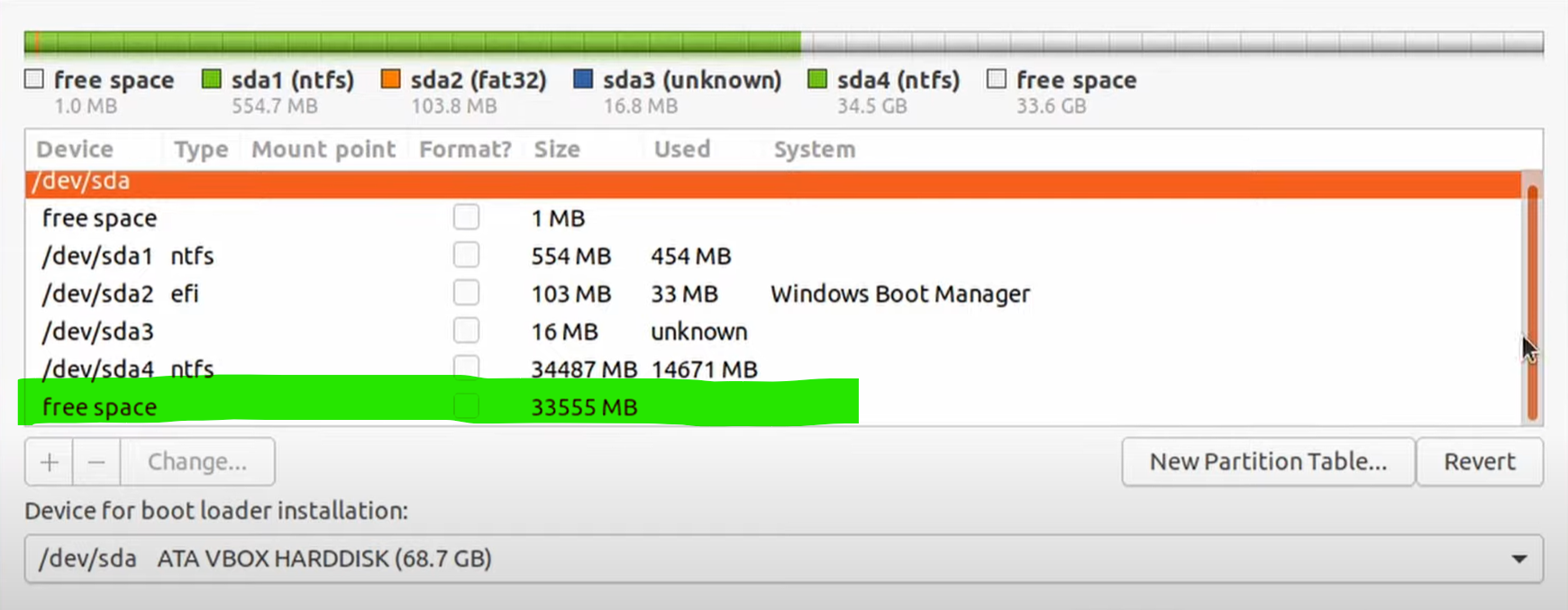
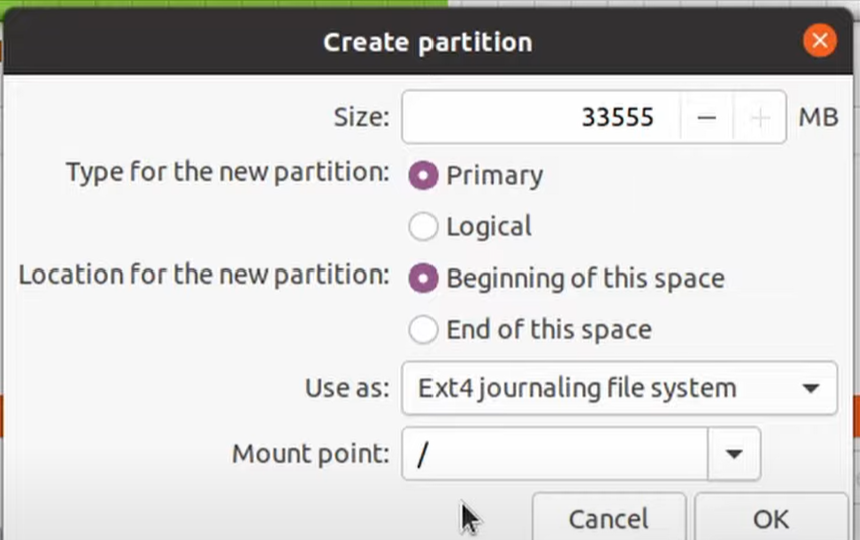
- (for dual boot on single hard disk) Installation type -> something else -> select drive -> use as: Ext4 journaling file system -> Mount point: select ` ` -> Device for boot loader installation -> Windows Boot Manager

- double click on the
free space, select file systemsExt4andmount point: \

most important: In dual boot mode, select the
Device for boot loader installation: /dev/sda2 Windows Boot Manager
If needed, follow this video if necessary
1.c) Best fit with old motherboard for this tutorial
- Check the windows BIOS mode,
-
Upgrading Overleaf Experience with Visual Studio Code and Local LaTeX IDEs
Integration with Visual Studio Code and OpenAI (my choice)
- Overleaf
- Install
Overleaf Worshopfrom Visual Studio Code Extension, more on the Overleaf Workshop github - Inspect » Network » Cookie or, as alternative
set-cookie(copy it) - Open
Overleaf Workshop» Login to Server » Login with Cookies » Paste the Cookie
- Install
- Install
Write Assist AI- go to
https://platform.openai.com/api-keysand generate anew secret keyand copy it - In Visual Studio Code, press
Ctrl + Shift+ Pto open theCommand Palette - Search
Write Assist AI: Set OpenAI API Key - Paste the secrete key
- go to
- Add New Server » Network » Referer (copy) »
- Big thanks to Thiemo Fetzer’s youtube tutorial
Integration with Local Text Editor and GitHub
- Menu » GitHub (connect with github account)
- Follow standard github procedure, you can commit, push, pull to the remote repository.
- Edit with the LaTeX IDEs: e.g., TexStudio, Texmaker, etc.
- One create a commit, Menu » GitHub» (pull it to the overleaf)
Other (faster) Options
Alternatives of Overleaf
- Overleaf
2021
-
Creating and Google Indexing GitHub Pages
GitHub Pages
- GitHub allows only one free hosting static page against per github account
- Developers can develop their page with
HTML, CSS,Javascript, or any other languages if like. - Important: for this your github account name, and newly created repository name must me the same. For example, if your github account is
sample-git, then your page name must besample-git.github.io, which later will generate urlhttps://sample-git.github.io - You can not
pushfiles to your repository, upload templates, or develop manually. - There are many awesome repositories for templates, for instance, jekyllthemes.
Google Indexing
- Adding GitHub Page to google indexing (see the image)
- now go to the
https://search.google.com/search-console/welcome?hl=en&utm_source=wmx&utm_medium=deprecation-pane&utm_content=home - take the url prefix for verification (second option)
- paste your url, you will have a
google_verification.htmlcode - simply upload it to your github main repository
- wait a bit, because the github takes some time, then click on the verify in google search console.
- now go to the
- go to the https://developers.google.com/search
- Google Analytics: https://analytics.google.com/